Instruction for Dimmable CCT Tuning Luminaire Remote Controller:
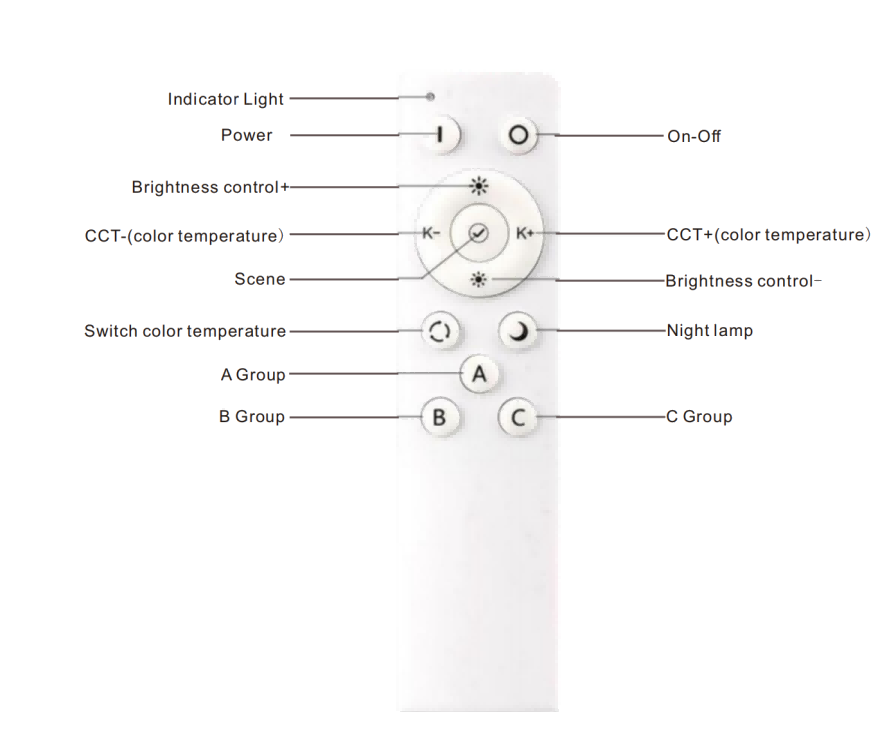
1. Pairing Code: Press and hold the A/B/C button on the remote controller within 3 seconds after power-on. A flashing indicator on the luminaire indicates successful pairing, and the luminaire will be assigned to the corresponding group;
2. Clearing pairing Code: Press and hold the ALL OFF button on the remote controller within 3 seconds after power-on. A flashing indicator on the luminaire indicates successful clearing. After clearing, the remote controller will no longer be able to control the luminaire;
3. Scene setting: When the button is long-pressed, the luminaire will flash, indicating that the current brightness and color temperature have been saved. A short press on the button switches to the saved brightness and color temperature settings;
4. A/B/C Buttons: Long press to perform pairing; short press to turn on/off the luminaires in the corresponding group;
5. ALL ON/ALL OFF: Turn on/off all luminaires in groups A, B and C simultaneously.